ThingStudio: flow programming for microcontrollers
Node-RED-style flows for ESP32, Pico, nRF52840 and STM32 boards, compiled to MicroPython and run on the board itself. Beta and open source.
Node-RED-style flows for ESP32, Pico, nRF52840 and STM32 boards, compiled to MicroPython and run on the board itself. Beta and open source.
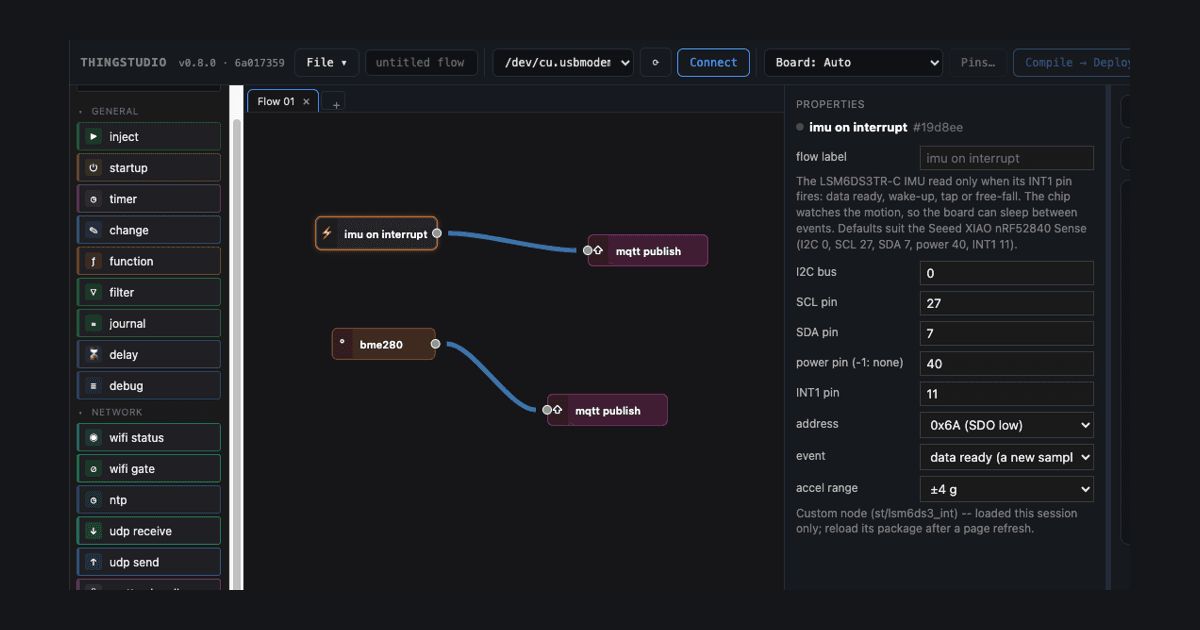
Inspired by Node-RED, ThingStudio gives you a visual flow programming environment for microcontrollers running MicroPython. It runs on ESP32, RP2040 and RP2350 (Raspberry Pi Pico), nRF52840 and STM32. Fully local: no cloud, no account.
You can try the editor in your browser, with nothing to install. You can build a flow, compile it and read the MicroPython it makes. To run a flow on a real board, install ThingStudio.
Free and open source · Apache 2.0 · macOS, Linux, Windows · Source on GitHub
Who it's for
ThingStudio is for people who can already program and have used a microcontroller. You don't need an electronics degree, but you should be comfortable wiring a breadboard and typing commands in a terminal.
Coming from another tool? Read what's different for you: Node-RED, MicroPython, or Arduino and C.
asyncioYours
ThingStudio is designed to be private, and as open and hackable as possible. The editor sends nothing home, and the online demo runs in your browser and sends nothing either.
Events
A typical microcontroller program runs one main loop forever: read the sensors, check the buttons, update the outputs, go round again. Each new job makes the loop longer, and a slow step holds up everything else.
A ThingStudio flow responds to events instead. Each response runs only when its event happens, and the board waits on many events at once. Event-driven programming explains more.
ebutton→ gpio out
timer→ bme280→ mqtt publish
mqtt subscribe→ function→ neopixel
Three chains in one flow. A button press lights an LED, a timer reads a sensor and publishes it, and a message from the network sets a colour. None waits for the others.
Architecture
In Node-RED, the editor and the runtime are one program on one computer. ThingStudio splits them. You build the flow on your computer; ThingStudio compiles it to MicroPython and sends it to the board over USB or WiFi.
The flow is saved on the board. Close the editor, unplug the cable, and it keeps running. It starts again after a reset or power cycle. A change is a new deploy, not a firmware build, and takes seconds.
Your computerThe editor, in your browser. Compiles the flow to MicroPython,
then to .mpy bytecode.
USB or WiFi
The boardMicroPython, the flow, and only the libraries it uses. Nothing else.
A blank board? Tools → Install firmware… writes MicroPython onto ESP32 and Pico boards from the editor.
Hardware
Boards can have a definition file, which lists the board's pins, its LED, which pins are reserved and why, and which pins each SPI and I2C bus can use. Pins… in the editor shows it as a pin cheat sheet, and for boards like the Pico lays out the header the way the board looks.
ThingStudio comes with definitions for a handful of boards. For anything else, add your own: a short JSON file. Point an AI at the web site for a given board and it can usually generate one in a few seconds. Check the result against the datasheet! :-)
Every pin in a flow is checked against the board it's for. Each pin and bus is set up once and shared. If a pin doesn't exist, would crash the board, or two nodes would set it up differently, the compile stops and says why, before anything reaches the board.
Flows respond to events, and the board waits on many at once: interrupts, debounced buttons, a rotary encoder, an analog input that only reports when a reading crosses its bounds.
interrupt ebutton eswitch encoder adc gpio out pwm out bme280 neopixel timer
The button, switch and encoder drivers are Peter Hinch's micropython-async primitives.
Flows
Pick nodes from the palette and draw wires between them. Messages travel along the wires, with the value
in msg['payload'], as they do in Node-RED. A timer, a function and a pin make a blinking LED.
Built-in nodes cover pins, buttons, sensors, MQTT, HTTP and UDP. When they aren't enough, write MicroPython in a function node, or package it as a custom node with its own place in the palette.
ThingStudio also has a built-in GUI system. It links the data in a flow to GUI widgets, such as text, numbers and a histogram of a reading's recent history, which you lay out in pages with the gui screen node. It drives SPI displays, like the one on the Cheap Yellow Display. It's at an early stage, but it already works. See the GUI nodes.
inject timer function change filter delay journal ntp mqtt publish mqtt subscribe http request udp send wifi status http in udp receive debug gui screen gui readout gui histogram
Every node has a page in the node catalog.
AI
You can, and ThingStudio is built for it. An AI assistant can write a flow for you from a description.
What you get back is the difference. Code from an AI is notoriously hard to read. Because each node does a large piece of the work, the flows an AI writes stay compact, however much they do. You can usually understand them at a glance, and change them by hand, of course.
The flow is common ground. The AI works inside fixed nodes with typed connections, and the check names the node behind each error, so the assistant can fix its own mistakes.
Most of the test flows I run on my own boards are now written this way. I've written more about it on my blog.
The assistantWrites the flow file, checks it with
thingstudio-compile, and fixes each error it names.
a flow file
YouOpen it on the canvas, read it, change it, and deploy it to your board.
The AI authoring guide has the setup, and a ready-made skill for Claude.
Chips
What matters is the processor. If your board has one of these chips and runs MicroPython, pick the chip from the Board menu and start.
Boards with a definition also get a pin cheat sheet: their own pins named, such as the LED, and the reserved pins marked. Supported hardware lists them, with the sensors and displays that have built-in nodes.
Support for the chips comes from MicroPython. It runs on all of these, and it's tested far more widely than I could manage. On each board shown, I've checked ThingStudio's layer on top: pins, SPI and I2C buses, deploying a flow, and the nodes. That's one person's testing so far, which is why this is a beta.
| Chip | Checked on |
|---|---|
| ESP32 | Wemos D1 R32, CYD (ESP32-2432S028) |
| ESP32-S2 | LOLIN S2 Mini |
| ESP32-S3 | Freenove ESP32-S3 Display |
| ESP32-C3 | LuatOS ESP32C3-CORE |
| ESP32-C5 | ESP32-C5-KITC-A |
| RP2040 | Raspberry Pi Pico, Pico W |
| RP2350 | Raspberry Pi Pico 2 |
| nRF52840 | Seeed XIAO nRF52840 |
| STM32F405 | Pyboard v1.0 |
Welcome
Hi, I'm Mike Karliner.
I've been a huge fan of flow programming since the early days of Node-RED.
Equally, I've been keen on MicroPython since it came out, and in fact I backed the original Kickstarter way back in 2013.
So, I thought, why not combine the best of both worlds?
ThingStudio is my attempt to do just that. Obviously, it's not an exact copy: its native language is MicroPython, for a start, and it's running on bare metal.
It is, and will stay, open source under a permissive licence.
Mike
It works on my bench, and I've checked it runs on every board I've been able to get my hands on. But I'm not the best person to find the rough parts, especially in getting started. So it's in beta: it works, and now it needs people other than me to set it up and use it from the docs alone. Expect rough edges, and gaps in the docs that I just can't see.
Whether it worked or not, post one line in the "First impressions" thread: your board, and how far you got. "Pico W, blinking in 20 minutes" is useful. "ESP32, gave up at the firmware install" is more useful.
Rather keep it private? Email info@thingstudio.net.
Not ready to try it yet? Leave your email and I'll write when there's something worth trying: new boards, new nodes, and the end of beta.
Just your email address, held by EmailOctopus. Their form loads only when you press the button, and brings a font from Google with it. Every email has an unsubscribe link.
Getting started installs ThingStudio, writes MicroPython onto your board, and deploys your first flow.
Visits are counted with GoatCounter, run on my own server: pages viewed, the site you came from, browser, screen size and country. No cookies, and nothing that identifies you. Clicks on the "Try it in your browser" buttons are counted too. The editor demo counts nothing; its server keeps a three-day access log, with the end of each address masked, only to run the server. If you sign up for updates, your email address is kept by EmailOctopus and used for nothing else.
Texto de thingstudio.net tal como lo publicó, leído de su página y mostrado aquí con el formato de El Autómata. El original, en thingstudio.net · Volver a la noticia de El Autómata