Jonquil: a pragmatic editor for the Lisps you use · jonquil.b12n.app · El Autómata
Lunes, 16 de noviembre de 2026
Portada de las 21:50
Todos los periódicos y la radio, en unoEscrito por IA a partir de Hacker News · Cómo se hace
Hacker News
jonquil.b12n.app · texto original
Jonquil: a pragmatic editor for the Lisps you use
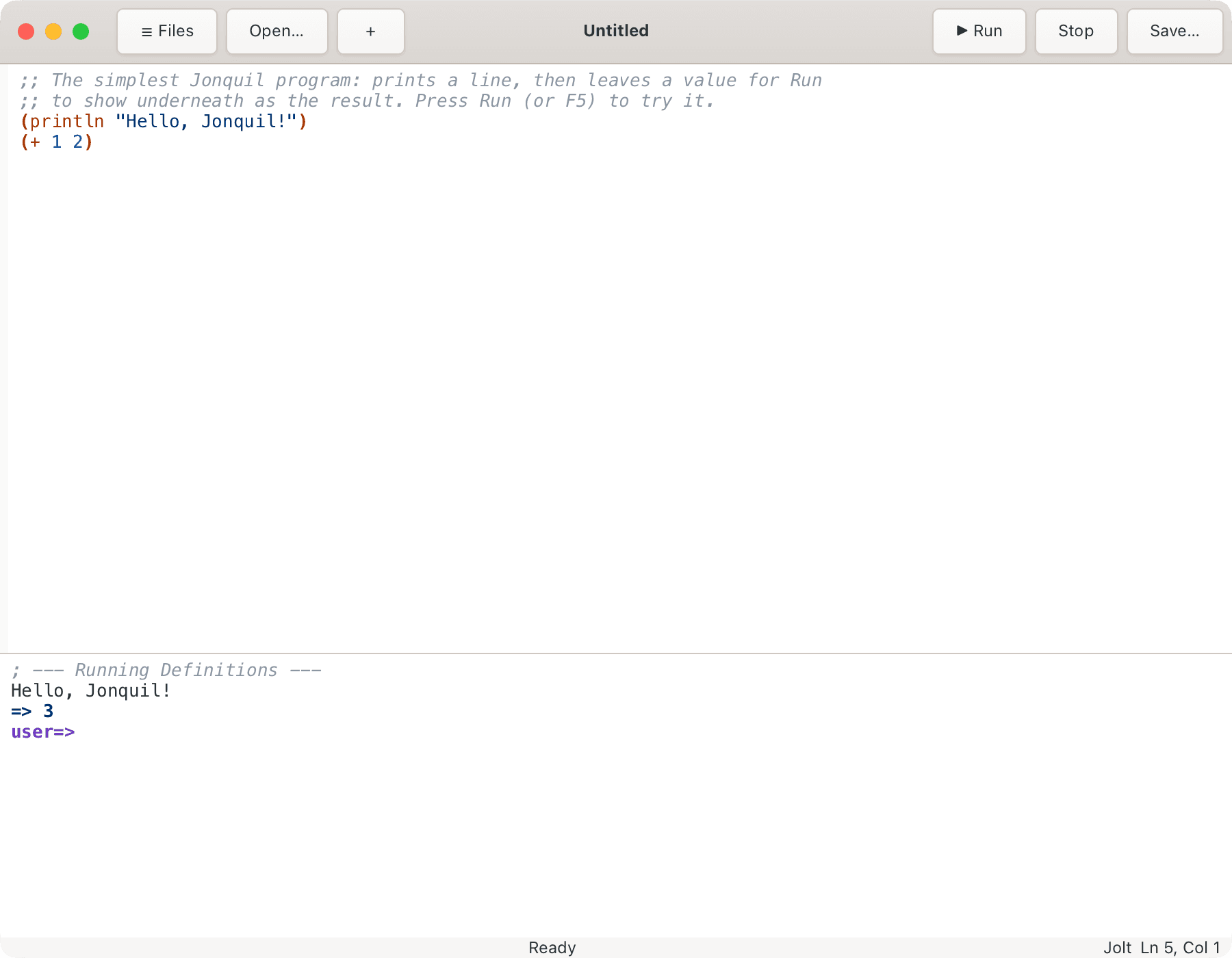
Jonquil is a DrRacket-style editor for Jolt, Clojure, ClojureScript, jank, Basilisp and babashka. Edit code at the top, press Run, see the results in a REPL underneath, and Stop really stops a runaway program.
Alpha · macOS (Apple Silicon) · Linux from source · open source, EPL-2.0
Jonquil is a DrRacket-style editor for Jolt, Clojure, ClojureScript, jank, Basilisp and babashka. Edit code at the top, press Run, see the results in a REPL underneath, and Stop really stops a runaway program. On Jolt it goes further: your program runs on the editor's own runtime, so the inspector and the debugger see its real values.
Runs
Jolt
Clojure
ClojureScript
jank
Basilisp
babashka
ClojureDart
Why Jonquil
A pragmatic editor, with a live Lisp underneath
The DrRacket loop for every Lisp you use, and on Jolt, the tools of a Lisp Machine.
Six dialect profiles pick the runtime for whatever file is open. Jolt runs in or out of process, jank and ClojureScript are launched for you, and the rest attach over nREPL.
Describe Key, the locations list, presentations in the console, Save World, the Processes panel: ideas from the MIT CADR and Symbolics Genera, working on your program's live values.
A plugin is one Clojure file of commands, keys, hooks and agent tools. An agent can drive the window over MCP, and a dialect profile is the plug point for the next Lisp.
Run and Stop
Run the top, read the bottom
Run evaluates everything in the editor, the REPL prompt evaluates one line, and Stop ends a program even when it's spinning in a loop. It's the DrRacket loop, for every dialect.
Reset on Run clears only what the running tab created
read-line reads from the console, so stdin just works
An unclosed bracket gets a plain message pointing at it
Emacs is extended in a different Lisp from the one you write. Jonquil is written in Clojure on Jolt, and your Jolt code runs on that same runtime, so the tools look at real values, not the editor's.
Console results are live: click to inspect, right-click for verbs
Change sets bundle the forms you changed, to apply or revert
Save World keeps a project's data vars; the Processes panel shows its fibers
On Jolt: breakpoints, Step Into, Over and Out, Break on error, and the last error's frames with every local. Retry, Edit and retry, and Define and retry pick a failed evaluation back up in every dialect.
F9 toggles a breakpoint in the gutter, live at once
Completion with a doc preview, quick doc, jump to definition and rename all ask the live runtime, whichever Lisp it is. The menus and the command palette list every command with its key.
Ctrl+Space completes in the editor and at the prompt
F12 jumps into your project, or into library code
Find Usages tells same-named symbols apart by their ns
Jonquil has 42 structural editing commands, and they follow Calva's paredit. Slurp, barf, drag, splice and wrap all leave the brackets balanced. You'll find them under Edit > Structure and in the command palette, or you can turn on the Calva paredit key set to get Calva's keys.
The guide shows every command before and after, and a test runs each row against the real command
Preferences lists every command with its key, and you change one by pressing the new key
Your keys are saved in keys.edn, and a key you set shows in the menus at once
Ctrl+` or Terminal in the View menu shows a terminal under the editor, on a tab beside Interactions. A login shell starts in your project's folder and keeps running until you close the window.
The downloaded app carries VTE, so it works with nothing to install
If something is still running in it, closing the window asks first
Built and tried on macOS, and not run on Linux yet
jonquil --mcp serves six tools over MCP with no window. Add --window and an agent opens, edits, saves and runs tabs while you watch, through twenty tools.
An agent can propose a plugin, and it waits for your Accept
--mcp-attach bridges to a window you already have open
Jonquil picks a dialect profile for whatever file is open, and its status bar says which one and whether the runtime is up.
Jolt, in or out of process
Jonquil's own Lisp, and the one breakpoints, stepping and Break on error need. A program in a deps.edn project runs out of process over nREPL, so one that crashes or calls System/exit takes down a child, not Jonquil. A loose file runs in Jonquil's own process.
Every screenshot here is captured from the real app by Jonquil's own docs harness. Click one for a closer look.
Themes
16 themes to pick from
Light is the default. Cmd/Ctrl+Shift+M cycles through them all, or type "theme" in the command palette to pick one by name. Auto follows your Mac's Light or Dark mode, and a theme recolours the whole window. More in the guide.
Plugins in one file
A plugin adds commands and keys, hooks on saves, Runs and errors, and tools an agent can call. Each version that goes live is kept, so you can see its history and revert.
(p/defplugin
  {:id      :wrap-when
   :doc     "Wrap the form at the caret in (when ...)."
   :effects #{}
   :commands
   [{:id :wrap-when/wrap :scope :editor
     :edit (fn [snapshot]
             (p/wrap-form snapshot "(when " ")"))}]})
Room for the next Lisp
A dialect is a profile: what its files look like, how they're painted, which evaluator runs them. A profile's port file is most of what an attach runtime needs.
Off by default. Turn on Smart and each open bracket closes itself as you type, dedenting a body line pulls the closer up, and indenting pulls it back in. Cmd/Ctrl+Shift+M cycles through the themes.
Jonquil ports the idea of DrClojure and lifts its pure text-analysis code: the tokenizer, brackets, smart indent, the formatter. The front end is GTK4 on direct FFI, rebuilt in Jolt, and the Jolt fixes the project needed went upstream.
The header bar's buttons can be chosen in settings.edn: :header {:start [...] :end [...]} lists command ids, left to right at each end.
The window's parts can be placed in settings.edn: :layout {:left [...] :right [...] :bottom [...]} puts the file tree, the REPL, the terminals and the right-hand panels (the…
Parts can move while the window is open. Right-click a part's tab for Move to Left, Move to Right or Move to Bottom, or type "move" in the palette, which also reaches a part that has no tab.
Get started
Download Jonquil 0.4.4
Signed and notarized, for Apple Silicon Macs on macOS 26 or newer. GTK comes inside the app, so it opens and runs a file straight away. To run a project (a folder with a deps.edn), also install Jolt and git. Intel Macs and Linux build from source.
With Homebrew, which also puts a jonquil command on your PATH: