8088 Domination Post-Mortem, Part 1
These next few posts are a technical write-up of how I created 8088 Domination, which is a program that displays fairly decent full-motion video on a 1981 IBM PC. Before reading further, it might b…
These next few posts are a technical write-up of how I created 8088 Domination, which is a program that displays fairly decent full-motion video on a 1981 IBM PC. Before reading further, it might b…
These next few posts are a technical write-up of how I created 8088 Domination, which is a program that displays fairly decent full-motion video on a 1981 IBM PC. Before reading further, it might be worthwhile to familiarize yourself with the production itself if you haven’t seen it. Here is video of what it looks like running on a 1981 IBM PC 5150 connected to a TV via the composite output jack:
…and if you doubt the above video’s authenticity, you can download the production and run it on your own vintage hardware as proof.
I would like to apologize in advance for switching between past tense (ie. my thought process during the design phase) and present tense (when describing how to achieve certain objectives) throughout this write-up.
I’ve been fascinated by desktop digital video for decades. Starting with the first Video For Windows tools in the early 1990s, using early capture hardware (like the Media Vision Pro Movie Spectrum, which captured directly into MSV1/CRAM format), I’ve toyed with desktop video and its possibilities.
Of course, I’ve also been fascinated with demos since the early 1990s, and when you love two things that much, you find ways to mash them together. Many of my demoscene productions have had video as a part or whole of them in some way. Grind (1993) was a modplayer that displayed dancing Spring Break girls in perfect time to the music; the end-part of Explicit (1996) has dancing clubbers embedded in cubes, also dancing in perfect time to the music; and of course 8088 Corruption (2004) which displayed FMV on a 1981 IBM PC and took a chunk out of my 15 minutes.
8088 Corruption was not recognized for amazing quality video, but rather its novel solution to the problem of trying to display FMV on such a limited platform. That solution was to use 40×25 text mode, since that was the only mode represented in an amount of video memory that could be completely changed every frame without distracting artifacts or overtaxing the system.
I gave a talk in 2007 that explained 8088 Corruption in detail, and in that talk I explained that displaying FMV using CGA in graphics mode would be impossible. This is because CGA graphics mode uses 8x the amount of video memory that 8088 Corruption was handling. Even a simple calculation assuming 24fps video reveals that the amount of data needing to be updated per second (24fps * 16KB = 384KB/s) is outside of the IBM PC’s capability: CGA RAM can only be changed at a rate of 240KB/s, and most hard drives of the era operate at roughly 90KB/s. It sure felt impossible, so that’s why I said it.
Then I thought about the problem for 7 years.
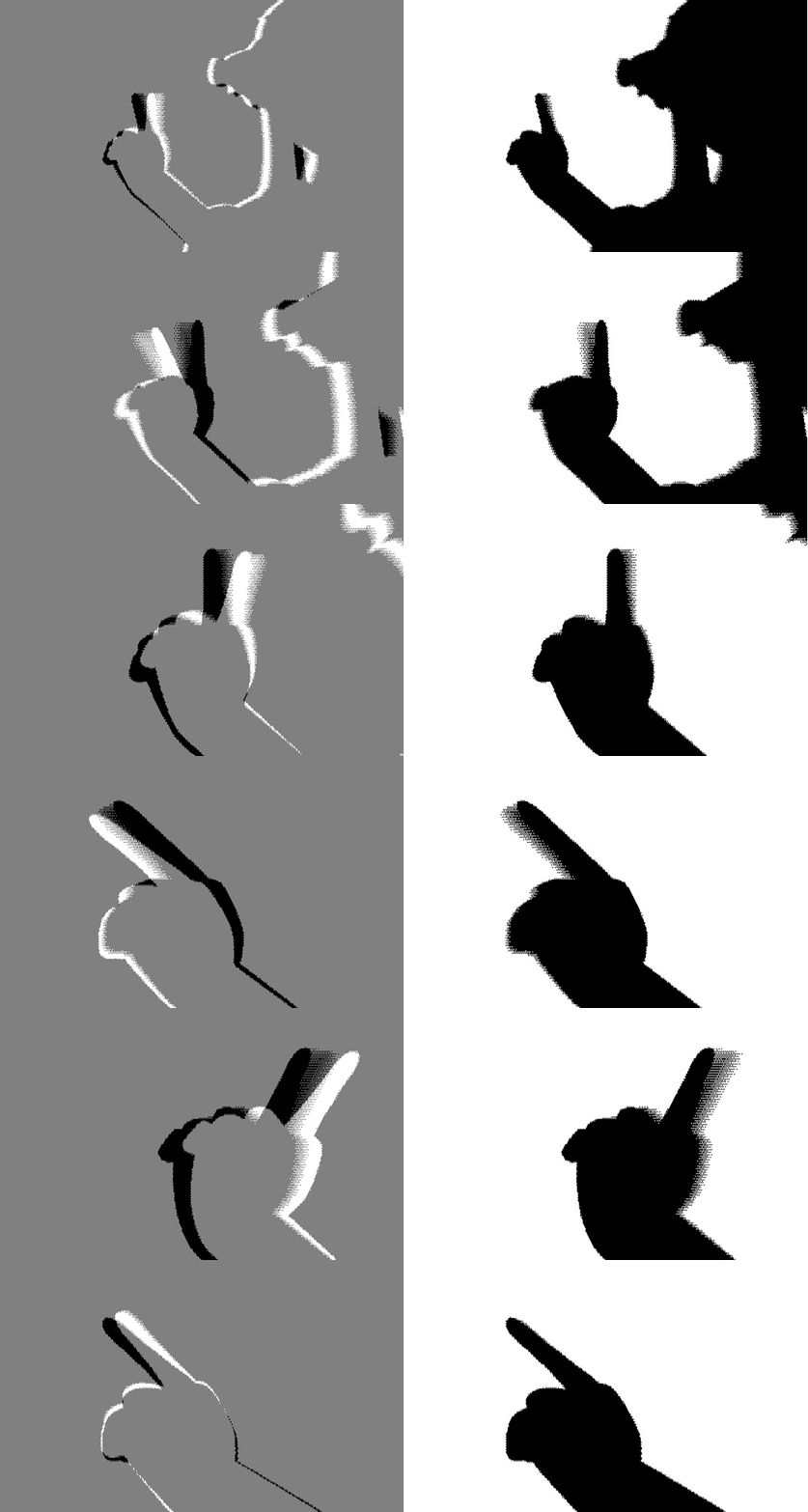
I came to several realizations over the past few years thinking about this “impossible” problem. The most basic realization is that it isn’t always necessary to change every single pixel on the screen to show convincing FMV. If only a portion of the frame is in motion, such as in traditional animation, or a “talking heads” newscast, not every pixel is changing onscreen. But even if all pixels in a frame are changing, they might only be changing just a little bit… and if they are changing that little, the viewer might not notice if we cheat and don’t change them at all. So, we need to let go of the idea that we must change the entire screen every frame. With the right picture content, we can get away with changing only a portion of screen memory, and it will look like we’re changing the entire screen.
Left: Black and White=differences, Grey=unchanged. Right: What the user sees after applying only the changes
Another realization was found re-evaluating what kind of bandwidth is available on the system. Previously, I was using the “40×25 text mode 2K of RAM” definition as the limit of what can be changed onscreen. But “2K of data changed” isn’t the real limitation; rather, it’s “not exceeding the time it takes to alter 2K”. In other words, the real limitation is not exceeding a specific time quantum per frame updating screen memory, no matter how much screen memory you’re changing.
This lead to a similar thought about disk I/O. In Corruption, I treated disk bandwidth as a series of fixed-length reads at a frequency of the framerate I needed to produce. As a result, Corruption uses fixed-length video+audio packets, so that (framerate * packetsize) is guaranteed to be less than the available disk bandwidth. But there’s no reason to adhere to that; the real limitation is the disk I/O itself, and I could read any amount of disk I wanted in a given time period as long as I didn’t exceed what the hardware could provide. This lead to the realization that video+audio packets could be of a variable length.
The combination of these and other ideas led to the design of a system that could fulfill the original requirement of “FMV in graphics mode”, which means we need a system that:
Because the IBM PC is not fast enough to make these decisions realtime (nor has the bandwidth to do so), all of these constraints needed to be handled during the encoding phase, when we have nearly unlimited time. That also means that most (if not all) of these constraints are really just data management problems, which I’ll get to later. But before we write even a single line of code, we need to back up a little and see how to convert 24-bit color pictures into something that doesn’t look like total crap on a CGA card.
A quick primer on CGA: CGA was the first color graphics standard for the IBM PC, and contains 16KB of memory to hold screen contents. That memory can be presented as a few different graphics modes that appear different, but are actually all the same under the hood: 80 “byte columns” wide by 200 lines. Those 80 byte-columns can be sliced up a few different ways:
Let’s see what those look like in practice. Here’s a pretty hummingbird:
…and here’s that hummingbird converted to our three basic choices without any fancy processing:
160×200, 16 colors
320×200, 4 colors, palette 1
640×200, 2 colors
Already the graphics programmers in the audience are screaming DITHER THAT SHIT, and they would normally be correct. However, most dithers that people are familiar with are error-diffusing dithers, which means that error differences are propagated throughout the entire picture. This is not a good idea for a system that is going to be recording changes between frames just like LoL does in their challenger series, because if a single pixel changes in the source material, every single pixel in the dither algorithm’s row scanning order after the change is going to change as well. What we need is a so-called stable or localized dither, where the value of each output pixel does not depend on its neighbors. That way, when only a local area of the source material changes, only that area of the destination dither will change as well.
While there are some modified, alternate dithers that keep error propagation to a spatial minimum (ie. Riemersma dither, which dithers along a Hilbert curve), the only truly localized dithering algorithm I know of is ordered dithering, sometimes called Bayer dithering. Some of the best publicly-available research on color ordered dithering is by Bisqwit (“Yliluoma’s arbitrary-palette positional dithering algorithm“) so I won’t try to explain the concepts here; consult that instead.
Applying even a rudimentary ordered dither to our sources now shows this for our hummingbird converted to our three graphics modes:
160×200, 16 colors, ordered dither
320×200, 4 colors, palette 1, ordered dither
640×200, 2 colors, ordered dither
Much nicer, and we don’t have to worry about the dither introducing massive differences between frames if only one pixel changes in the source.
While all three of those modes look viable in their own way, for Domination I had to make the decision to discard the middle one (320×200, 4 colors). This is because the 16-color and 2-color modes display properly via the composite output jack on the CGA card, and I knew I’d have to present at the compo with the native hardware hooked up to a projector. So my choices were limited to 160x200x16 and 640x200x2.
The very fastest way to change screen memory on the 8088 is to either copy a linear sequence of bytes using REP MOVSB, or set a linear sequence of bytes all to the same value using REP STOSB. With this in mind, I chose to keep track of each change as a starting and ending offset of changed bytes, because that was closest to the exact method I would be using to “replay” those changes. I adopted a terminology to reduce confusion throughout the source code: I coined the term “delta” to refer to an area of changed bytes, and further classified deltas into “slices” (a delta where not all bytes are the same) and “runs” (deltas where all bytes are the same). This was important because “runs” can fill screen memory extremely quickly using REP STOSB, so it was worth keeping track of them. Here is the actual data structure I used:
  TDelta=object(TObject)
    startOfs:word;         {starting offset of delta in buffer (first changed byte)}
    endOfs:word;           {ending offset of delta in buffer (last changed byte)}
                           {rest are calculated during insert or other operations:}
    dtype:deltaType;       {slice or run}
    fillvalue:byte;        {for informational purposes only, not used for anything}
    blength:word;          {length of delta in bytes}
    numPixelsChanged:word; {# of pixels changed in the entire delta}
    REPcycleCost:real;     {different whether slice or run}
    frozen:boolean;        {flag used to control various optimization phases}

    Constructor Init(starto,endo:word);
    Destructor Done; virtual;
  end;
All of these deltas needed a good structure to collect and manage them, so I decided to use a Turbo Pascal 7 data structure called a TSortedCollection, which is analogous to a sorted linked list. Deltas were added to this list and maintained in sorted order using a variety of criteria in the following priority:
The sort order seems like an odd thing to mention here, doesn’t it? I’ve done so because it was a contributing factor to the success of the project, as it solved many data processing problems later on. It was so helpful that I think it’s worth going over in detail:
For the curious, this is what the sort operator looked like:
Function TDeltas.Compare;
{
We want to maximize motion fidelity, so we are going to make our lives
easier and sort deltas by size.
Note that the comparisons are reversed -- that's because we want the largest
deltas at the beginning of the list.  (-1 means beginning of collection.)
- We add a second comparison so that deltas of the same length are sorted
by cycle execution time; this keeps runs prioritized over slices in terms
of what to prioritize if our bandwidth gets starved.
- We add a third comparison so that runs of the same run value
are kept together, so that we can cache the run value.
- We can optionally add a fourth comparison so that, all things being equal,
deltas are sorted by start offset compensated for CGA interlaced memory layout
(this is what I'm colloquially calling "Dave Murry interlace handling"
based on how Dave handled it in the PC booter Sierra Championship Boxing).
}

var
  k1so,k2so:word;

begin
  k1so:=PDelta(Key1)^.startofs;
  k2so:=PDelta(Key2)^.startofs;
  if MurryHandling then begin
    {if k1so > screenRAMsize div 2 then k1so:=k1so-(screenRAMsize div 2);
    if k2so > screenRAMsize div 2 then k2so:=k2so-(screenRAMsize div 2);}
    k1so:=k1so AND $1fff;
    k2so:=k2so AND $1fff;
  end;
  {sort by delta length}
  if PDelta(Key1)^.blength > PDelta(Key2)^.blength
    then Compare := -1
    else if PDelta(Key1)^.blength  PDelta(Key2)^.fillvalue
            then Compare := -1
            else if PDelta(Key1)^.fillvalue < PDelta(Key2)^.fillvalue
              then Compare := 1
              {sort deltas by start offset}
              else if k1so  k2so
                  then Compare := 1
                  else Compare := 0;
end;
With the data structures finalized, encoding one video frame's worth of changes becomes a simple matter of doing the following:
That’s pretty much it. When I release the source in a few weeks, you’ll see that the code implements the above logic very closely. However, there’s one very important detail that I haven’t explained yet, and it’s critical to playback performance: What does “encode the delta to disk” mean exactly, and how do we play an encoded delta back to screen memory as quickly as possible? Head on over to the conclusion of our thrilling tale, where I’ll explain how I came up with a unique solution to that problem.
Texto de trixter.oldskool.org tal como lo publicó, leído de su página y mostrado aquí con el formato de El Autómata. El original, en trixter.oldskool.org · Volver a la noticia de El Autómata